Compaction: The Hidden Trick That Keeps AI Coding Agents from Forgetting Everything
AI agents operate within a fixed context window. As it fills up, they use two strategies to stay useful: observation masking (replacing verbose tool outputs with placeholders) and LLM summarization.

11:34 PM on a Thursday. I’m three hours into a debugging session with Claude Code, and something strange just happened.
I asked Claude to remember the authentication pattern we discussed at the start of the session. The pattern that took us twenty minutes to nail down. The one that was supposed to guide everything we built afterward.
Claude had no idea what I was talking about.
The code was still there. The files we’d edited were perfect. But the why—the architectural decisions, the trade-offs we’d discussed, the context that made everything make sense—had vanished into thin air. My AI pair programmer had amnesia.
This wasn’t a bug. This was compaction. And I’d just learned the hard way that it’s the most important feature of AI coding agents that nobody tells you about.
AI agents operate within a fixed context window. As it fills up, they use two strategies to stay useful: observation masking (replacing verbose tool outputs with placeholders) and LLM summarization (compressing older turns). Masking wins on cost and performance. If you’re using Claude Code,
/compact,/context, andCLAUDE.mdare your primary levers. If you’re building agents, skip to Implementing Compaction in Your Own Agent for the architectural patterns.
When Your AI Assistant Runs Out of Memory
AI coding agents don’t have unlimited memory. They have a context window—think of it like RAM, but for conversations. Claude Sonnet can hold around 200,000 tokens. That sounds like a lot until you realize that a single three-hour coding session can generate 300,000 tokens easily.
Every file you read. Every command you run. Every response Claude generates. All of it piles up in that context window like dirty dishes in a sink.
JetBrains Research studied this problem in late 2025 and found that software engineering agents’ contexts grow so rapidly that they become prohibitively expensive, yet they don’t deliver significantly better task performance. You’re paying more for worse results.
The math:
Most LLMs charge per token, for both input and output
Longer contexts = higher cost per message, on every message
At 32,000 tokens, 11 out of 12 tested models dropped below 50% of their short-context performance
JetBrains found unmanaged context nearly doubled task cost vs. masked context — $3.47 vs. $1.52 per task on SWE-bench

One thing worth keeping separate: context limit and cost budget are different problems. You can hit your daily cost budget while still at 40% context capacity, or blow through the context window on a single large refactor within your first hour. The context window limits what fits in one request; your cost budget limits how many requests you can afford. Managing both requires different strategies.
What Is Compaction, Really?
Compaction is the art of forgetting strategically.
When your context window starts filling up, the agent doesn’t just throw away the oldest messages (that’s truncation, and it’s terrible). Instead, it compresses the context—keeping the essential information while discarding the noise.
For AI agents, compaction happens automatically when you approach the context limit. Claude Code, for example:
Clears older tool outputs first (the verbose stuff like test logs)
Summarizes earlier conversation turns
Preserves your recent requests and key code snippets
Keeps architectural decisions and patterns
The goal isn’t perfect memory. It’s useful memory.
The “Lost in the Middle” Problem LLMs pay disproportionately higher attention to the beginning and end of context. Content in the middle of a long prompt — even critical content — gets systematically under-weighted. Compaction exploits this deliberately: recent, high-value context stays at the end of the prompt where attention is highest. Older, compressed summaries sit in the middle where the model naturally under-weights them anyway. This is why “just add more context” often makes things worse, not better — you’re diluting the signal.
The Two Techniques
When JetBrains researchers tackled this problem on SWE-bench Verified, they compared two approaches:
Observation Masking: The Simple Winner
When an older interaction contains a long output—say, a 500-line test log or a verbose API response—replace it with a placeholder:
[Previous tool output: 2,847 tokens, masked to save context]You keep the action and the reasoning (”I ran the tests to check for race conditions”) but discard the wall of output text.
Observation masking reduced costs by over 50% while matching or exceeding more sophisticated techniques in four out of five test scenarios.
One detail that matters for code specifically: mask at syntactic unit boundaries. If you truncate mid-function, the model reasons over a broken code fragment — which is worse than no masking at all. You’re feeding it a hallucination prompt. Mask the entire function output or mask nothing.
LLM Summarization: The Sophisticated Alternative
This approach uses a second AI model to compress older conversation chunks into concise summaries:
Before (1,200 tokens):
You: Can you add error handling to the payment service?
Claude: I'll add error handling. First, let me read the current implementation...
[reads payment_service.py]
[reads error_handler.py]
[reads config.py]
The current implementation catches IOError but not TimeoutError...
[long analysis continues]
After summarization (150 tokens):
[Summary: Added comprehensive error handling to payment_service.py,
catching TimeoutError and ConnectionError in addition to existing IOError.
Updated retry logic to use exponential backoff. Tests passing.]
The catch: LLM summarization adds about 15% to agent runtime. You’re calling a second model to compress the context, and that takes time and money. In practice, the simple masking approach often wins.
The Hybrid
The best production systems combine both:
Use observation masking for verbose outputs (tool results, logs, API responses)
Use summarization for complex architectural discussions
Keep recent messages uncompressed
JetBrains found this hybrid approach delivered the best cost-performance balance.
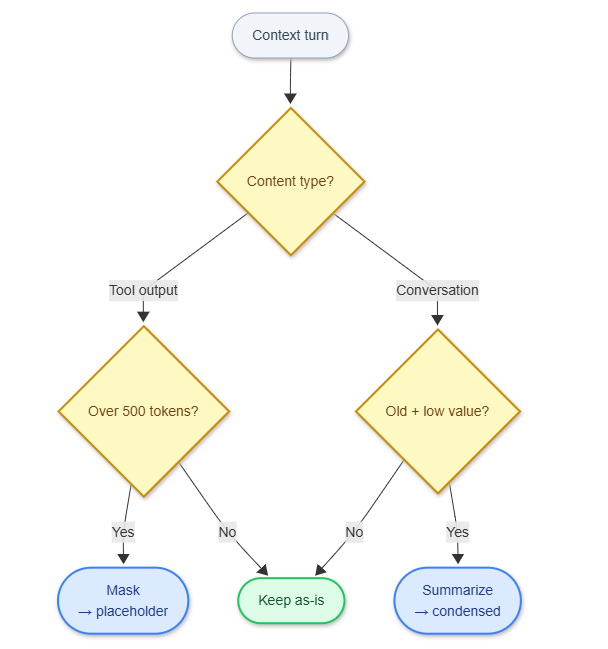
Decision logic for choosing between observation masking and LLM summarization. Mask tool outputs aggressively; only summarize old conversation turns.
How Compaction Progresses in Practice
Phase 1: Clean Context (0-50K tokens) Everything fits. Claude remembers every detail.
Phase 2: Background Output Eviction (50-150K tokens) Claude starts clearing older tool outputs automatically. You don’t notice anything. The agent still remembers your architectural decisions because those are in the conversation text, not the tool outputs.
Phase 3: Active Summarization (150-200K tokens) Claude starts summarizing older conversation chunks. This is where you might see:
Claude compacts automatically, but instructions from early in
the conversation can get lost.
That’s when you need to get strategic.
The Commands That Save Your Session
The commands below are Claude Code-specific. The underlying concepts — inspect usage, compact with a focus hint, reset the session — exist in every major agent. Quick reference:
ConceptClaude CodeCursorGitHub CopilotWindsurfInspect context usage/contextToken indicator (status bar)Conversation token counterToken meter (top bar)Focused compaction/compact focus on X———Reset session/clearNew ChatNew conversationNew sessionPersistent project configCLAUDE.md.cursorrules.github/copilot-instructions.md.windsurfrules
Cursor, Copilot, and Windsurf don’t expose a manual compaction command — their architectures handle context differently (see How Other Agents Handle This). The inspect and reset primitives exist everywhere.
/context - Your Early Warning System
Before you hit the wall, check what’s eating your context:
/contextThis shows you:
Total tokens used
How much space your conversation history takes
How much context MCP servers consume (often surprisingly large)
How much headroom you have left
Run this before starting any major refactoring.
/compact - Controlled Compression
Instead of letting Claude compact randomly, you can focus it:
/compact focus on the API design decisionsThis tells Claude: “When you compress the context, preserve everything related to API design decisions. Drop the other stuff.”
I use this when I’m switching between different subsystems. Working on the frontend after spending two hours on the backend? Compact with a focus on keeping frontend context.
/clear - The Nuclear Option
Sometimes you need a fresh start:
/clearThis wipes the conversation history but keeps your files and project structure. Use it when you’re moving to a completely different task.
Don’t clear blindly. If you’ve made important architectural decisions, save them first.
Persistent Context Files
Every major coding agent reads a project-level config file at the start of each session — before any conversation history. This is the most reliable compaction-proof storage you have: architectural decisions placed here survive /clear, fresh sessions, and any amount of summarization.
AgentFileNotesClaude CodeCLAUDE.mdSupports markdown headings; loaded automaticallyCursor.cursorrulesPlain text; also supports cursor.rules in repo rootGitHub Copilot.github/copilot-instructions.mdScoped to repo; markdownWindsurf.windsurfrulesPlain text rules; loaded per workspace
All follow the same pattern: short (100-200 lines), high-signal, updated as the project evolves. Here’s what belongs in one (example in Claude Code’s CLAUDE.md format, but the content applies anywhere):
# Project Context

## Architecture Decisions
- Using PostgreSQL with read replicas (decided 2026-01-15)
- Authentication via JWT tokens stored in httpOnly cookies
- API rate limiting: 100 req/min per user, 1000 req/min per IP

## Patterns We Follow
- All API endpoints return {success, data, error} structure
- Database migrations use Alembic with descriptive names
- Tests use pytest with fixtures in conftest.py

## Build Commands
- Tests: `pytest tests/ -v`
- Local server: `make dev`
- DB migrations: `alembic upgrade head`
The authentication discussion from hour one? It’s in the config file. It never gets compressed away.
Subagents: Isolated Context Windows
You can isolate context using subagents.
A subagent is like spawning a fresh Claude session for a specific task. It gets its own context window, completely separate from your main conversation.
When to use subagents:
Refactoring a large file (keeps the main conversation clean)
Running exploratory analysis on data
Testing different approaches in parallel
The subagent does its work, returns a summary, and disappears. Your main context stays pristine.
In Claude Code, the Task tool automatically uses subagents for certain operations. You can also trigger them explicitly for research tasks.
How Other Agents Handle This
Every major coding agent has a different answer to the same problem.
Cursor takes a retrieval-first approach. The entire codebase is chunked, embedded, and indexed into a vector store. When you send a message, Cursor retrieves the top-K semantically similar chunks and assembles context on demand — reducing a 10M-token codebase to an 8K-line window per turn. No accumulation, no compression needed. The tradeoff: retrieval misses implicit dependencies. If your answer depends on a config file that wasn’t semantically close to your query, it won’t be retrieved.
GitHub Copilot in agent mode builds context dynamically by calling workspace tools in a loop — file search, symbol lookup, directory scan — until it has what it needs. If the assembled context exceeds the window, it drops the least relevant chunks. Relevance-ranked truncation, not time-ranked. You don’t control the ranking; you trust it.
Windsurf Cascade assembles context from multiple live sources on each turn: open files, imports, related files, your real-time edits. The context is reconstructed each turn rather than accumulated. The architecture is fundamentally different from session-based agents — there’s no conversation history to compact; there’s a live codebase graph to query.
Devin (Cognition) surfaced something unexpected in 2025: context anxiety. As Devin approached its context limit, it started cutting corners — leaving tasks incomplete, generating premature summaries, wrapping up work it hadn’t finished. The fix was counterintuitive: enable a larger context window but cap usage programmatically at a lower threshold. The model behaved normally because it never perceived itself approaching a boundary. Devin also uses fine-tuned summarization models at agent-agent handoff boundaries — when a sub-agent reports back to the orchestrator, a specialized small model compresses the handoff rather than the main model doing it.
The pattern across all four: no perfect solution exists. Cursor’s retrieval misses implicit state; Copilot’s ranking is opaque; Cascade doesn’t publish how it handles hard limits; Devin’s approach requires custom fine-tuning infrastructure. Compaction is the most transparent and controllable option when you need to understand what your agent actually remembers.
What Compaction Can’t Fix
Compaction isn’t magic.
1. Complex state machines If your agent needs to remember 15 different configuration changes across different services, compaction will eventually lose some details. Solution: Keep a running doc of changes, either in CLAUDE.md or a separate SESSION_NOTES.md.
2. Very long debugging sessions After 4-5 hours, even aggressive compaction runs out of room. Solution: Break your work into logical checkpoints. Commit, start fresh, link the sessions.
3. Context thrashing Switching between unrelated tasks in the same session. One minute you’re debugging auth, the next you’re refactoring CSS. Compaction can’t tell what’s important. Solution: Use separate sessions for unrelated work.
Implementing Compaction in Your Own Agent
If you’re building an AI agent pipeline — not just using one — the strategies above map to concrete architectural decisions. Here’s what you actually need to implement.
Choose a Retention Policy
Every compaction system needs a rule for deciding what to keep. Three patterns, in order of complexity:
Recency-weighted: Always keep the last N tokens uncompressed. Summarize or mask everything older. Simple to implement; works well when recent context dominates.
Type-based: Classify messages by type — user instruction, tool output, model reasoning, code diff. Retain instructions and code indefinitely; mask tool outputs aggressively (they’re the biggest token sinks). More implementation work, but meaningfully better for long coding sessions.
Salience-based: Score each message for importance (architectural decisions, error messages, file paths referenced). Retain high-salience messages; compress the rest. Requires a scoring model or heuristics, but gives you the most control.
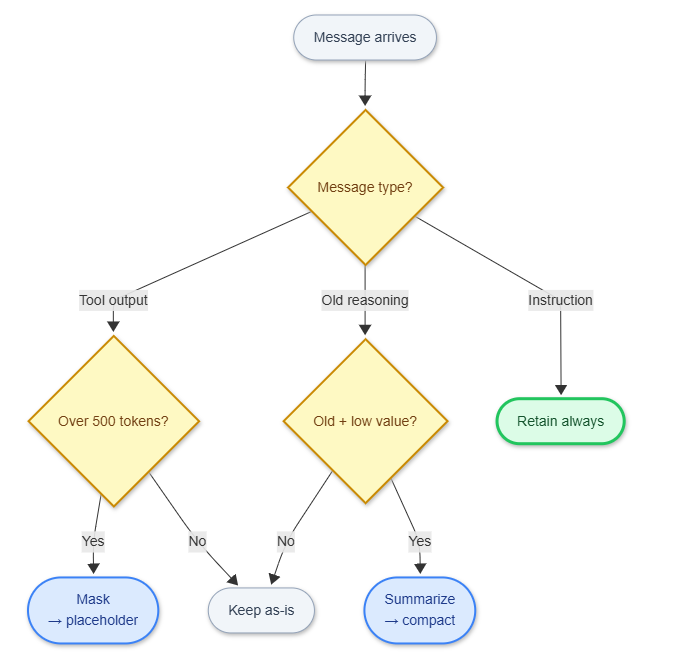
Type-based retention policy — the most practical starting point when building your own agent. Start here, then layer in salience scoring if needed.
Set Token Budgets Explicitly
Token budget management should be a first-class concern, not an afterthought:
MAX_CONTEXT = model_context_limit * 0.85  # 15% headroom
COMPACTION_TRIGGER = MAX_CONTEXT * 0.75   # Compact before hitting limit
MASK_THRESHOLD = 500  # tokens — mask any tool output larger than this
The 15% headroom isn’t just safety margin — it prevents the model from perceiving itself near a limit. That’s the context anxiety problem Devin discovered: models approaching their boundary start cutting corners. Buffer space keeps the model behaviorally stable.
Compress at Agent-Agent Handoffs
Compaction is especially important when sub-agents report back to an orchestrator. Passing the full sub-agent history is expensive and fills the orchestrator’s context fast. Use a structured handoff format instead:
{
  "task": "What the sub-agent was asked to do",
  "outcome": "success | failure | partial",
  "key_changes": ["List of significant changes made"],
  "decisions": ["Architectural decisions and rationale"],
  "blockers": ["Unresolved issues the orchestrator needs to know about"]
}
You don’t need your most capable model for handoff summarization. A smaller model (Claude Haiku, GPT-4o-mini) works well — summaries don’t require deep reasoning, and the cost savings add up: compaction runs on roughly 20-30% of turns, so a 4x cheaper model on those turns gives you ~20% total cost reduction.
What to Persist Outside the Context
Anything that must survive compaction should live outside the context window entirely:
WhatWhereWhyArchitectural decisionsProject config file (CLAUDE.md, .cursorrules, etc.)Loaded fresh each sessionSession stateExternal KV store or scratch fileSurvives session resets and new sessionsSub-agent resultsStructured log or databaseQueryable, not just readableIn-progress task stateCheckpoint formatEnables resumption after context reset
The pattern: context window for working memory, external storage for long-term memory. Don’t fight the window limit — route around it.
The Performance Numbers
Source: JetBrains Research, “Efficient Context Management for Software Engineering Agents,” December 2025. Benchmarked on SWE-bench Verified.
Without any compaction:
Average cost per task: $3.47
Average tokens per task: 247,000
Tasks completed: 18 out of 25
With observation masking:
Average cost per task: $1.52 (56% reduction)
Average tokens per task: 108,000
Tasks completed: 19 out of 25 (5% improvement)
With LLM summarization:
Average cost per task: $1.68 (52% reduction)
Average tokens per task: 119,000
Tasks completed: 18 out of 25
Runtime: 15% longer
The simple technique won. Observation masking was cheaper, faster, and slightly more effective at completing tasks.
Why? Because summarization sometimes loses important details in the compression. A placeholder saying “[2,847 tokens of test output]” is often more useful than a bad summary. JetBrains also found that LLM summarization lengthened agent trajectories — summaries masked failure signals, so agents kept pushing down unproductive paths instead of recognizing they were stuck.
When to Use Each Strategy
Use automatic compaction (Claude’s default) for:
Normal coding sessions under 2 hours
Bug fixes and small features
Exploratory work
Use focused compaction (/compact focus on X) for:
Switching between subsystems
After completing a major milestone
When you need to preserve specific decisions
Use your persistent context file (CLAUDE.md, .cursorrules, .github/copilot-instructions.md, etc.) for:
Architectural patterns that apply session-to-session
Build commands and project structure
Core design decisions
Use subagents for:
Parallel exploration of different approaches
Large file refactoring
Research that generates tons of output
Use /clear and start fresh for:
Completely unrelated tasks
When you’ve hit 4+ hours in a session
After finishing a feature and moving to the next
The Alternatives: Why Compaction Wins
RAG (Retrieval-Augmented Generation)
RAG and compaction are often framed as alternatives. They’re not — production systems use both, for different jobs.
RAG works well for static, retrievable knowledge: codebase search, documentation lookup, “what does this function do.” Cursor’s architecture is essentially RAG-first: index the codebase, retrieve relevant chunks per turn, never accumulate. Fast, cost-efficient, scales to million-line codebases.
Where RAG breaks down is conversational state — the implicit context that accumulates during a working session. “That thing we discussed 45 minutes ago about why we chose async over sync” doesn’t map to a retrievable document. It was a reasoning exchange that produced a decision. Semantic similarity won’t find it reliably.
The hybrid pattern that works in practice:
RAG for codebase knowledge: file contents, function signatures, documentation
Compaction for session state: decisions made, approaches tried, architectural reasoning
Persistent config (
CLAUDE.md,.cursorrules,.github/copilot-instructions.md, etc.) for stable project-level context
The mistake: treating them as competing approaches and picking one. They solve different parts of the memory problem.
Use RAG for: Documentation, code search, symbol lookup across large codebases Use compaction for: Maintaining conversation flow, preserving reasoning history
Sliding Windows
Just keep the last N messages and drop everything older. Simple, but catastrophic. You lose the architectural decisions from hour one, the pattern you agreed on in hour two, and the workaround you discovered in hour three.
Never use pure sliding windows for coding sessions. You’re trading predictable costs for random amnesia.
Unlimited Context
“Just use a model with 1M+ tokens!” Sure, if you want:
3-10x higher costs per message
Slower response times (attention scales quadratically)
Degraded performance (models struggle with very long contexts)
The NoLiMa study showed that even models that support huge contexts perform worse as context grows. Gemini 2.5 Pro maintains decent performance up to 192K tokens, but most models degrade much earlier.
Compaction + smart context management beats unlimited context in both cost and quality.
Putting It Into Practice
After that Thursday night authentication disaster, I changed my workflow:
Check context usage every hour during long sessions (
/contextin Claude Code; token indicator in Cursor/Windsurf)Keep architectural decisions in your project config file (
CLAUDE.md,.cursorrules, etc.), not just in conversationCompact proactively when switching focus (
/compact focus on Xin Claude Code)Start fresh sessions for unrelated tasks instead of context thrashing
Use subagents or isolated sessions before diving into deep refactoring
If you’re on Claude Code: run /context before you begin a session, work for 90 minutes, then run it again. You’ll watch it fill faster than you expect. Run /compact focus on [your core task], check /context again, and you’ll see exactly how much headroom you recovered. The equivalent on Cursor is watching the token counter in the status bar — same principle, different UI.
If you’re building agents, the architectural takeaways are simpler than they look:
Mask large tool outputs at syntactic boundaries — it’s free performance
Set token budgets at 75-85% of the model limit, not 100%
Use structured handoff formats at agent-agent boundaries
Route long-term memory to external storage; stop fighting the window limit
RAG and compaction solve different problems — use both
The deeper lesson: context management isn’t a feature you bolt on. It’s an architectural constraint you design around from day one. Every production agent team eventually learns this. Most learn it the hard way.
The dirty secret of AI agents isn’t that they’re brilliant. It’s that they’re brilliant at forgetting the right things — and the teams who ship working agents are the ones who figured out how to tell them what to forget.