Deep dive into the OpenClaw Gateway architecture
The Universal Adapter Pattern: Unifying WhatsApp, Slack, and Signal into a Single AI Stream

When I first started reading through the OpenClaw, I expected to find a tangle of microservices working to gather like multi agent system. An event bus. Maybe a Redis instance for session state. Something distributed. What I found instead was a single Node.js process — one that handles everything — and it took me a while to stop being suspicious of that and accept that it was actually the right call.
There’s a quote buried in the OpenClaw docs that I keep coming back to:
“The Gateway is the always-on control plane; the assistant is the product.”
That single line captures the architecture. The Gateway is not the AI. The Gateway is the infrastructure that makes the AI useful — routing messages, managing sessions, executing tools, persisting state. The LLM is a capability plugged into it.
This article is about what the Gateway actually is and how it works.
One Process to Rule Everything
When you run openclaw gateway, you start a single Node.js process. That process handles everything:
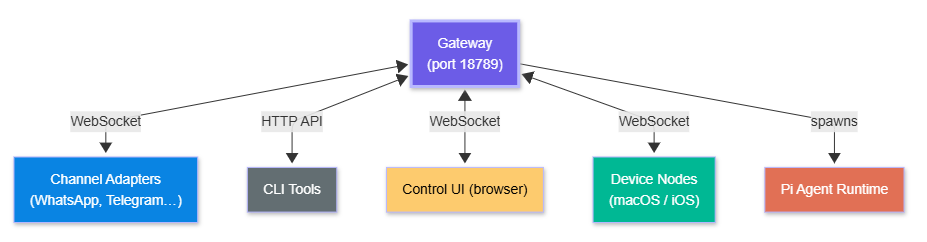
WebSocket connections from messaging channel adapters
HTTP API (OpenAI-compatible) for external clients
The browser-based Control UI
Session state and conversation history
Tool execution and sandboxing
Agent runtime coordination
Config file watching and hot-reload
It listens on ws://127.0.0.1:18789 by default. Everything in the OpenClaw ecosystem connects to this port — channel adapters, CLI tools, the web UI, companion apps on iOS and Android, and peripheral device nodes.
What connects to the Gateway:
What the Gateway talks to externally:
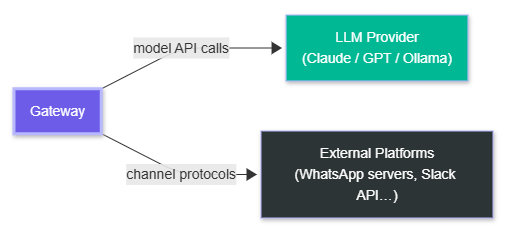
This single-process design is intentional. There's no service mesh, no message broker, no distributed state. The Gateway owns everything. On a personal machine, this simplicity is a feature — there's nothing to misconfigure, no partial state spread across services, no race conditions between components. I actually spent some time trying to find the catch here. I think for the intended use case — personal use on a machine you own — there genuinely isn't one.
The Part That Confused Me First: Sessions
A session is the unit of conversation state. Each session has:
A unique key encoding its scope
A JSONL transcript file on disk (
~/.openclaw/agents/<agentId>/sessions/*.jsonl)Configuration overrides (model, thinking level, verbosity, sandbox mode)
Auto-expiry after configurable idle period (default 60 minutes)
Session keys encode their routing context:
agent:{agentId}:{provider}:{scope}:{identifier}For example, a direct message on WhatsApp from a specific contact becomes a session scoped to that contact. A Discord server channel becomes its own session. The main CLI session is just main.
Session scoping modes (isolation levels):
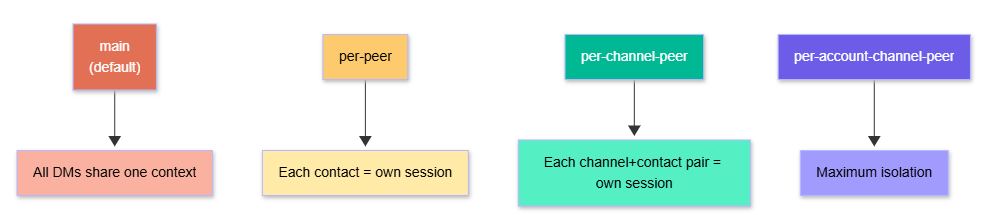
Session scoping modes (configurable per agent):
main— all direct messages share one session (default)per-peer— each contact gets an isolated conversationper-channel-peer— each (channel, contact) pair is isolatedper-account-channel-peer— maximum isolation, per account
Why does this matter? Because context bleeds between conversations if you’re not careful. A main session means everything you’ve discussed is in the LLM’s context window for every new message. A per-peer session means your WhatsApp contact’s conversation history doesn’t mix with your Telegram contact’s history. I defaulted to main and then hit a weird moment where the agent seemed to know context from an earlier conversation I’d forgotten about. That’s when I understood why this setting exists.
Channel Adapters
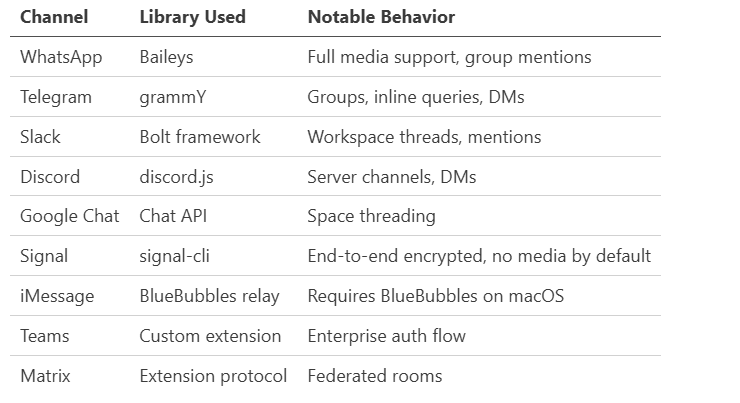
Each messaging platform is a separate adapter. The adapter handles the platform-specific protocol and normalizes messages into a common internal format before handing them to the Gateway.
Group routing logic: In group chats, the bot only responds when mentioned by default (activation: "mention"). You can set activation: "always" to have it respond to every message in a group — useful for dedicated bot channels.
DM security: Unknown senders get a pairing code by default (dmPolicy: "pairing"). The sender must reply with the code before the agent will process their messages. This prevents random people from accessing your agent if they somehow get your WhatsApp number. You can set dmPolicy: "open" if you want public access, but the docs specifically call this out as something openclaw doctor will flag. Don’t set it to open unless you know exactly what you’re doing.
Configuration: JSON5 with Hot-Reload
All Gateway configuration lives in ~/.openclaw/openclaw.json (JSON5 format — allows comments and trailing commas).
{
  // Primary agent configuration
  agents: {
    defaults: {
      workspace: "~/.openclaw/workspace",
      model: "anthropic/claude-opus-4-6",
      models: ["anthropic/*", "openai/*"],  // allowlist
      sandbox: { mode: "non-main" }          // sandbox non-main sessions
    }
  },

  // Channel access control
  channels: {
    whatsapp: {
      allowFrom: ["+15555550123", "+44..."],
      dmPolicy: "pairing",              // pairing | open | allowlist | disabled
      groupActivation: "mention"        // mention | always
    },
    discord: {
      allowFrom: ["username#1234"],
      groupActivation: "mention"
    }
  },

  // Networking (for remote access)
  gateway: {
    "tailscale.mode": "serve",          // serve | funnel | off
    "auth.mode": "password"
  }
}
The Gateway watches this file and hot-reloads changes.
Three hot-reload modes:
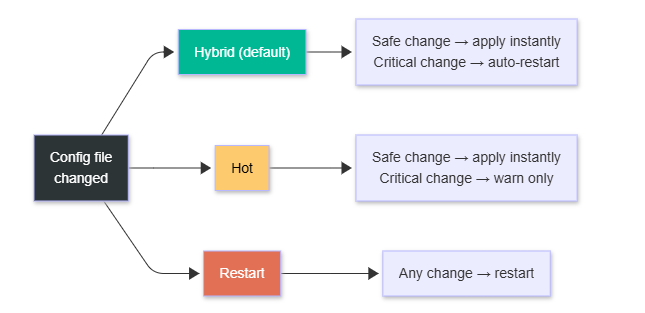
There are three reload modes:
Hybrid (default): Safe changes apply immediately. Critical changes (like port bindings) trigger an automatic restart.
Hot: Only safe changes apply. Warns you if a restart is needed.
Restart: Restarts on any config change.
Strict schema validation means the Gateway won’t start with unknown keys or invalid values. Run openclaw doctor --fix to diagnose and auto-repair common issues.
Environment variables: Config supports ${VAR_NAME} interpolation, so you can keep credentials out of the config file and in your environment or ~/.openclaw/.env.
The Agent Runtime: Pi Agent Core
The Gateway doesn’t implement the LLM conversation loop itself. That’s delegated to Pi Agent Core — an external library (@mariozechner/pi-agent-core) that handles:
Constructing the message history
Calling the model with streaming
Parsing tool call responses
Executing requested tools
Feeding tool results back to the model
Continuing until the model stops requesting tools
Pi Agent handles the core agentic loop. OpenClaw handles everything around it: channels, routing, sessions, memory injection, skill loading, and persistence.
The execution sequence for every incoming message:
1. Channel adapter receives message
2. Gateway routes to appropriate session
3. System prompt assembled:
     - IDENTITY.md  (who the agent is)
     - SOUL.md      (personality / tone)
     - TOOLS.md     (available tool schemas)
     - Active skills injected
     - Memory files prepended
4. Pi Agent called with context + tool registry
5. Model streams response
6. Tool calls executed (with policy chain validation)
7. Tool results fed back to model
8. Final response streamed to channel adapter
9. Transcript written to session JSONL
10. Memory manager runs post-compaction flush if needed
Steps 5–8 repeat in a loop until the model produces a response with no tool calls.
Tool Execution Policy Chain
Before any tool runs, it passes through a five-level policy chain:
global → provider → agent → session → sandboxEach level can allow, deny, or require confirmation for a tool. The most restrictive rule wins.
First-class tools:
Browser — Dedicated Chromium instance with CDP. Can run headless or headful. Same-engine for both; some sites block headless, so headful is sometimes needed (X/Twitter is called out specifically in the docs).
File system — Read/write within the workspace by default. Absolute paths can escape the workspace unless sandboxing is enabled.
Shell (
system.run) — Executes shell commands on the host. On macOS, requires the/elevated onsession flag. On paired nodes, requires device-level approval.Canvas/A2UI — Visual workspace the agent can push content to, take snapshots of, and evaluate.
Nodes — Device-local actions: camera snap, screen recording, location, push notifications. Only available on paired devices.
Automation — Cron jobs, webhooks, Gmail Pub/Sub listeners. These allow the agent to run without a user message triggering it.
Cross-session —
sessions_list,sessions_history,sessions_send. Agent-to-agent messaging.
Sandboxing: Non-main sessions (group chats, other channels) can run in Docker containers with bind-mount access to selected host directories. This prevents a compromised skill or a prompt injection attack from accessing your entire filesystem.
State and Memory on Disk
Everything persistent lives under ~/.openclaw/ by default:
~/.openclaw/
├── openclaw.json          gateway config
├── .env                   environment variables
├── agents/
│   └── <agentId>/
│       ├── auth-profiles.json   OAuth tokens, API keys
│       └── sessions/
│           └── *.jsonl          conversation transcripts
└── workspace/
    ├── IDENTITY.md         who the agent is
    ├── SOUL.md             personality / system prompt
    ├── TOOLS.md            tool schema inventory
    ├── AGENTS.md           multi-agent routing rules
    ├── MEMORY.md           long-term curated memory
    ├── memory/
    │   └── YYYY-MM-DD.md  daily notes
    └── skills/
        └── <skill-name>/
            └── SKILL.md   skill definition
The workspace/ directory is the agent’s “home.” It’s the default working directory for file operations, the source of injected context files, and where memory lives.
Memory architecture is two-tier:
Daily notes (
memory/YYYY-MM-DD.md): Running log of what happened today.MEMORY.md: Curated long-term facts — preferences, contacts, project context.
When the context window approaches capacity, a “silent pre-compaction memory flush” extracts key facts into MEMORY.md before history is pruned, so important information survives.
Multi-Agent Routing
One Gateway can host multiple agents. Each agent has its own workspace, auth profiles, session history, and identity.
The routing rules live in AGENTS.md:
# Agent Routing

Route messages from the #work Slack channel to the work-agent.
Route messages from personal WhatsApp contacts to the personal-agent.
Use the main agent for everything else.
The Gateway reads AGENTS.md and routes incoming messages to the appropriate agent based on channel, account, and peer. This enables "one CEO, many specialists" patterns — a research agent, a coding agent, a communication agent — all reachable through the same messaging surface, routed transparently.
Deployment Options
Local-first (standard):
Gateway runs on your machine. Everything stays local.
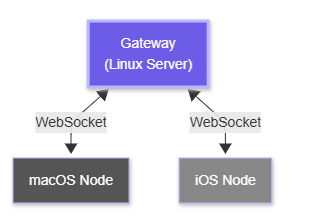
Remote Gateway + Device Nodes:
Gateway runs on a Linux server (no GUI required). Your macOS/iOS/Android devices pair to it as “nodes” — they expose local capabilities (screen recording, camera, notifications) to the remote Gateway via WebSocket.
Remote Gateway + device node topology:
Tailscale access options:
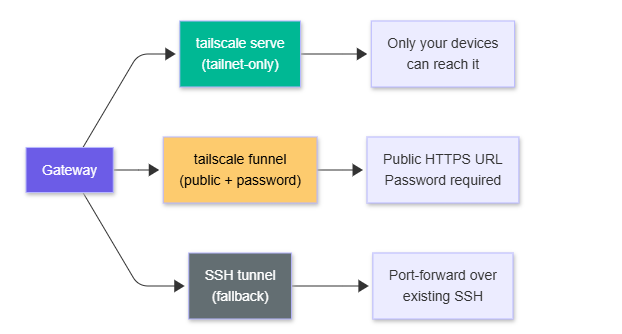
Tailscale is the recommended networking layer for remote setups. tailscale serve exposes the Gateway within your tailnet only. tailscale funnel makes it publicly accessible (with password auth enforced). I set mine up on a small Linux server over a weekend using Tailscale serve and it worked without issues — the Gateway just runs there, and my phone connects to it like it’s local.
The Gateway is intentionally boring infrastructure — a WebSocket server, a session store, a config file, a process manager. That boringness is a feature. The complexity in OpenClaw lives one layer up: in the agent loop, the skills system, and how memory is managed across sessions.